
Connect industry
past and future
with ProtoLinker

Integrate legacy infrastructure with modern protocols,
no coding, no hardware replacement and extend the life
of your infrastructure, accelerating your digital transformation.
Start bridging the gap now.

Features & Benefits

Industrial integration without the middleware headache.

Protolinker helps factories, system integrators, machine builders, and engineering teams connect industrial equipment, IoT services, databases, and business systems through a visual, configurable protocol bridge with a protocol library that keeps expanding as integration needs grow.

Lower integration cost Use existing equipment instead of replacing machines or building bespoke middleware.
Faster time to data Move PLC, sensor, broker, API, and database data into useful systems in fewer steps.
More control Know what is connected, how values are mapped, which scripts run, and where issues occur.
Less vendor lock-in Bridge multiple protocol families from one configurable application.
01 No-code protocol bridging Connect machines, brokers, APIs, and databases without custom scripts for every integration.

Create protocol connections, tags, and links from the interface instead of building and maintaining custom integration code for every machine, broker, API, or database connection.

  • Reduce engineering hours on repetitive integrations
  • Standardize projects across machines and sites
  • Commission data flows with less custom middleware
02 Growing protocol library Bridge today with Modbus, MQTT, OPC UA, REST, sockets, serial, and SQL while support keeps expanding.

Connect Modbus TCP, Modbus RTU, MQTT, OPC UA, REST APIs, TCP/IP sockets, serial devices, and SQL databases from one application, with client and server modes where the codebase supports them. Protocol support is designed to keep growing as more industrial and IoT integration cases appear.

  • Extend the life of working PLCs and legacy machines
  • Bridge OT data into modern IoT and software systems
  • Adopt one bridge that can expand with future projects
03 Visual tag and link mapping Make source-to-destination data routes visible before production data starts moving.

Define tags, choose source and destination protocols, and link data points through a structured workflow that makes every route visible before data starts moving.

  • See how each data point is connected
  • Lower configuration and handover risk
  • Make troubleshooting easier for operations teams
04 Scripts for industrial logic Transform, validate, format, or filter values when real equipment needs custom rules.

Add scripts to tags or links when values need transformation, validation, formatting, filtering, or custom business logic before they are forwarded to another system.

  • Transform values without rewriting the bridge
  • Support JSON, string, number, and raw outputs
  • Adapt standard integrations to edge-case equipment
05 Local protocol discovery Scan local networks and create supported protocol connections from detected endpoints.

Scan authorized local IPv4 networks, detect supported endpoints, review confidence and details, then create supported Modbus TCP, MQTT, OPC UA, or REST API connections from selected results.

  • Reduce manual setup and port checks
  • Find compatible services faster during commissioning
  • Choose safe, standard, or deep scan modes
06 SQL logging and AI reports Turn telemetry into reports with trends, anomalies, correlations, causes, and actions.

Store tag values in SQL databases and schedule AI-assisted reports that analyze machine and sensor data for trends, anomalies, correlations, possible causes, and recommended actions.

  • Turn raw telemetry into operational insight
  • Use optional Isolation Forest anomaly detection
  • Email reports to the people who need to act
07 Operational logs Track status changes, tag values, and errors with live viewing and plan-based retention.

Track protocol status changes, tag value changes, and errors with plan-based log lookback and retention, including real-time log viewing and direct access to log files.

  • Shorten root-cause analysis during downtime
  • Keep audit context for integrations and data flows
  • Use longer retention on higher plans
08 Disconnected buffering Buffer tag-link writes during short disconnects and flush them after reconnection.

Buffer tag-link writes while a destination is disconnected, then flush them when the connection is restored. Automatic reconnect logic helps integrations recover from transient network issues.

  • Reduce data loss during short disconnects
  • Control buffer size for expected outage windows
  • Keep production flows resilient without extra services
09 Import, export, and CLI startup Reuse JSON configurations and start repeatable deployments without rebuilding setup work.

Save integration configurations as JSON, import existing setups, and run in CLI mode with a stored file so repeatable deployments can be started without rebuilding the setup from the UI.

  • Reuse proven configurations across projects
  • Back up integration work before changes
  • Support headless startup workflows where needed
10 Cross-platform desktop app Use the same integration workflow on Windows, Linux, and macOS workstations.

Built with Qt and packaged for Windows, Linux, and macOS, Protolinker gives engineering teams a consistent integration tool across common industrial workstations.

  • Use the same workflow across operating systems
  • Deploy without dedicated gateway hardware
  • Keep integrations close to the machines they serve
11 Plan-based scaling Start small, then unlock unlimited mappings, scripts, all protocols, reports, and discovery.

Start with constrained testing on Free, unlock unlimited protocols, tags, and links on paid plans, then add scripts, all protocol types, AI reporting, discovery, and longer retention as needs grow.

  • Match cost to project maturity
  • Scale from pilot to production use
  • Control advanced capabilities by subscription tier
12 Status control and secure sessions Monitor connection state, restore saved sessions, and start or stop every protocol at once.

Sign in, restore saved sessions, monitor connection state, start or stop every protocol at once, and use the tray controls to keep integrations running in day-to-day operations.

  • Give operators clear connection status
  • Reduce manual start-stop effort
  • Keep user access tied to active plans
Ready to map your first protocol flow? Download Protolinker and start connecting existing equipment to modern systems.
Download Protolinker
Pricing

Plans that scale with your industrial integration needs

Start free, then upgrade when you need more protocols, automation, scripting, reporting, and long-term data visibility.

Free

For demos, testing, and small protocol experiments.

$0 /year
Start for Free
  • Up to 2 protocols
  • Up to 10 tags
  • Up to 20 links
  • MQTT and Modbus TCP only
  • 1-hour log lookback
  • 1-day log retention
  • 24h connection limit per protocol
No scripts No AI reports No discovery
Start

For small integrations that need unlimited mappings.

$349 /year
Choose Start
  • Unlimited protocols
  • Unlimited tags
  • Unlimited links
  • Most protocol types included
  • All except OPC UA and SQL Database
  • 1-day log lookback
  • 1-day log retention
  • No fixed connection time limit
No scripts No OPC UA No SQL Database

Pro

For advanced automation with scripting and all protocols.

$799 /year
Choose Pro
  • Unlimited protocols
  • Unlimited tags and links
  • Unlimited scripts
  • All protocol types included
  • Script automation included
  • Disconnected buffer included
  • Unlimited log lookback
  • 30-day log retention
No AI reports No discovery
Testimonials

What changes when machine data is easier to connect.

Protolinker gives teams a faster way to test, connect, and reuse industrial data flows without turning every protocol integration into a custom software project.

“The biggest surprise was how visible the integration became. We can see where each data point goes, change mappings quickly, and stop relying on one person who understands every script.”

Renata Costa Project Manager

“We did not have to replace the machine to get value from it. An older PLC started feeding data into a modern system, which opened up monitoring options we did not have before.”

Julio Ferreira Head of Maintenance

“For us, the value is flexibility. We can connect devices from different vendors, test new data routes, and adjust the flow without rebuilding the entire integration every time.”

Carlos Mendes System Integrator
Less custom work Turn protocol jobs into repeatable configurations
More data from old assets Keep working PLCs and devices useful for modern systems
Faster experiments Try new data flows before committing to larger changes
Curious what Protolinker could replace in your setup? Start with one machine, one protocol bridge, and one useful data flow.
Talk to us
FAQ

Questions teams ask before connecting their machines.

A quick guide to how Protolinker fits into industrial integration projects, from protocol support and legacy equipment to scripts, logs, discovery, and AI-assisted reporting.

Short answer

Protolinker is built for teams that need machine data moving sooner, without replacing working equipment or maintaining custom middleware for every protocol bridge.

Visual mappings Growing protocol support Local-first operation
What does Protolinker do?

Protolinker connects industrial and IoT systems so data can move between machines, brokers, APIs, databases, dashboards, and other tools. Instead of writing a custom bridge for every case, teams configure protocols, tags, and links visually.

Which protocols are supported?

The current codebase includes support for Modbus TCP, Modbus RTU, MQTT, OPC UA, REST APIs, TCP/IP sockets, serial connections, and SQL databases, with client and server modes where implemented. Protocol support is designed to keep growing as more industrial and IoT use cases appear.

Do we need to replace PLCs or add gateway hardware?

No. Protolinker is designed to work with existing equipment and existing communication channels whenever those systems expose supported protocols. That makes it useful for getting value from legacy machines before planning larger infrastructure changes.

Is this only for developers?

No. Developers can extend integrations with scripts, but the core workflow is visual: create protocol connections, define tags, link data points, and monitor status. This helps engineering and operations teams understand the data flow without reading custom code first.

Can Protolinker transform data before sending it?

Yes. On plans that include scripting, scripts can be attached to tags or links for formatting, validation, filtering, calculations, or custom logic. This is useful when a simple source-to- destination mapping is not enough for a real production case.

Can it help us find devices on the network?

Yes, protocol discovery is available on supported plans. Protolinker can scan authorized local IPv4 networks, detect supported endpoints, show confidence and details, and create compatible protocol connections from selected results.

What happens if a destination disconnects?

Protolinker includes reconnect handling and, on supported plans, disconnected buffering for tag-link writes. Buffered writes can be held during short disconnects and flushed when the destination reconnects, reducing the risk of losing important values during temporary outages.

Does Protolinker store logs?

Yes. Protolinker logs protocol status changes, tag value changes, and errors. Log lookback and retention depend on the active plan, with longer retention available on higher plans for debugging, auditing, and troubleshooting.

What are AI reports used for?

AI-assisted reports can analyze SQL-stored machine and sensor data for trends, anomalies, correlations, possible causes, and recommended actions. They are useful when teams want more than raw telemetry and need clearer operational insight from historical data.

Can we reuse configurations across projects?

Yes. Protolinker can export and import integration configurations as JSON. This helps teams back up working setups, repeat proven configurations, and start similar deployments faster.

Still wondering how your protocols would connect? Send us your integration case and we can help you identify the fastest path to useful data.
Ask about your setup
Start building

See what your machines can send when protocols stop getting in the way.

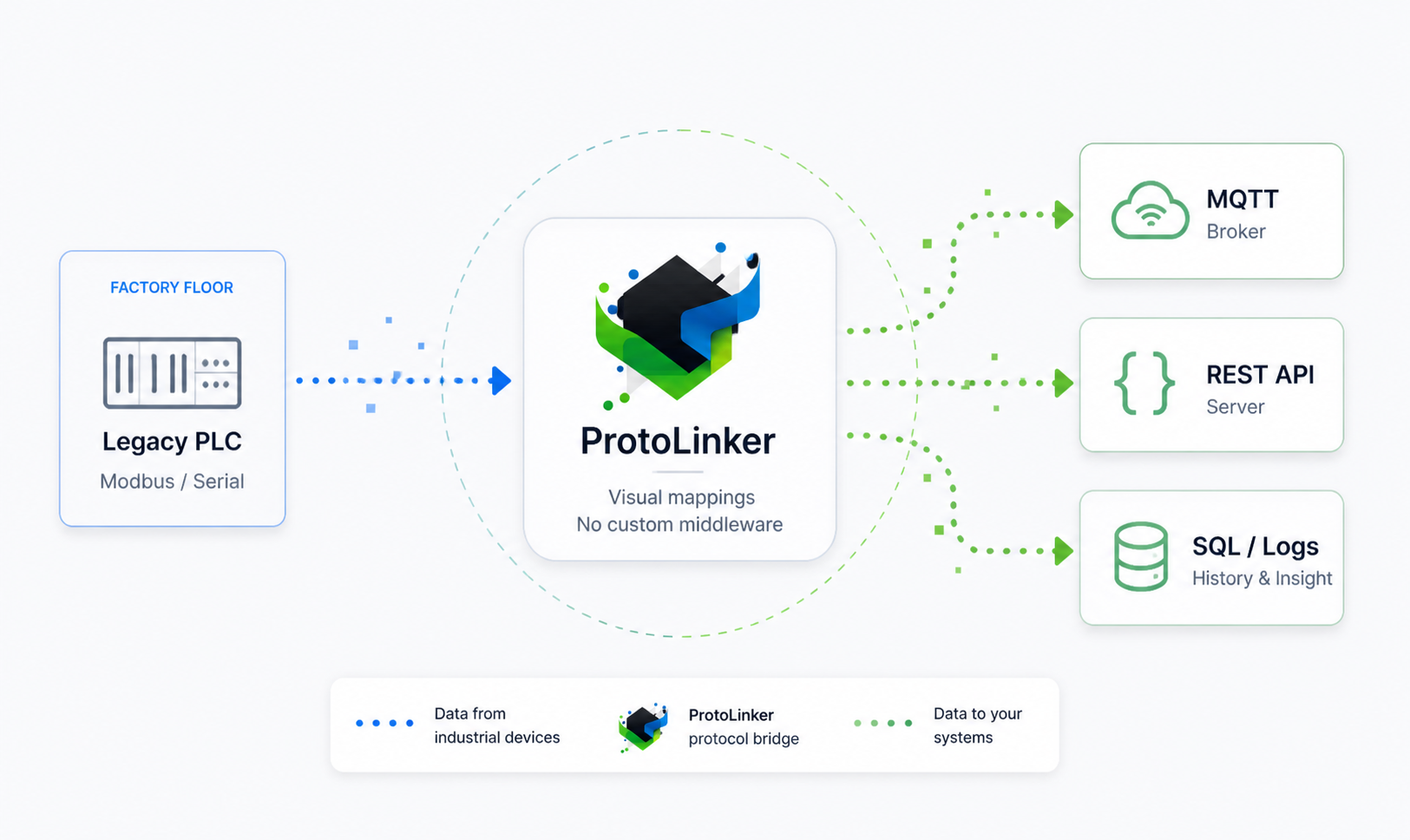
Protolinker protocol bridge diagram connecting a legacy PLC to MQTT, REST API, and SQL logs

Use Protolinker to test integrations, map data visually, and move industrial signals from PLCs, sensors, brokers, APIs, and databases into the systems your team already uses.

Start with existing equipment Connect legacy PLCs and devices before considering replacements.
Experiment faster Try new protocol flows without turning every idea into a software project.
Grow with new protocols Use a bridge designed for an expanding industrial and IoT protocol library.